INTERACTION DESIGN + USER INTERFACE
Less clicking, more insights — a sidebar that brings the right context to the dashboard.
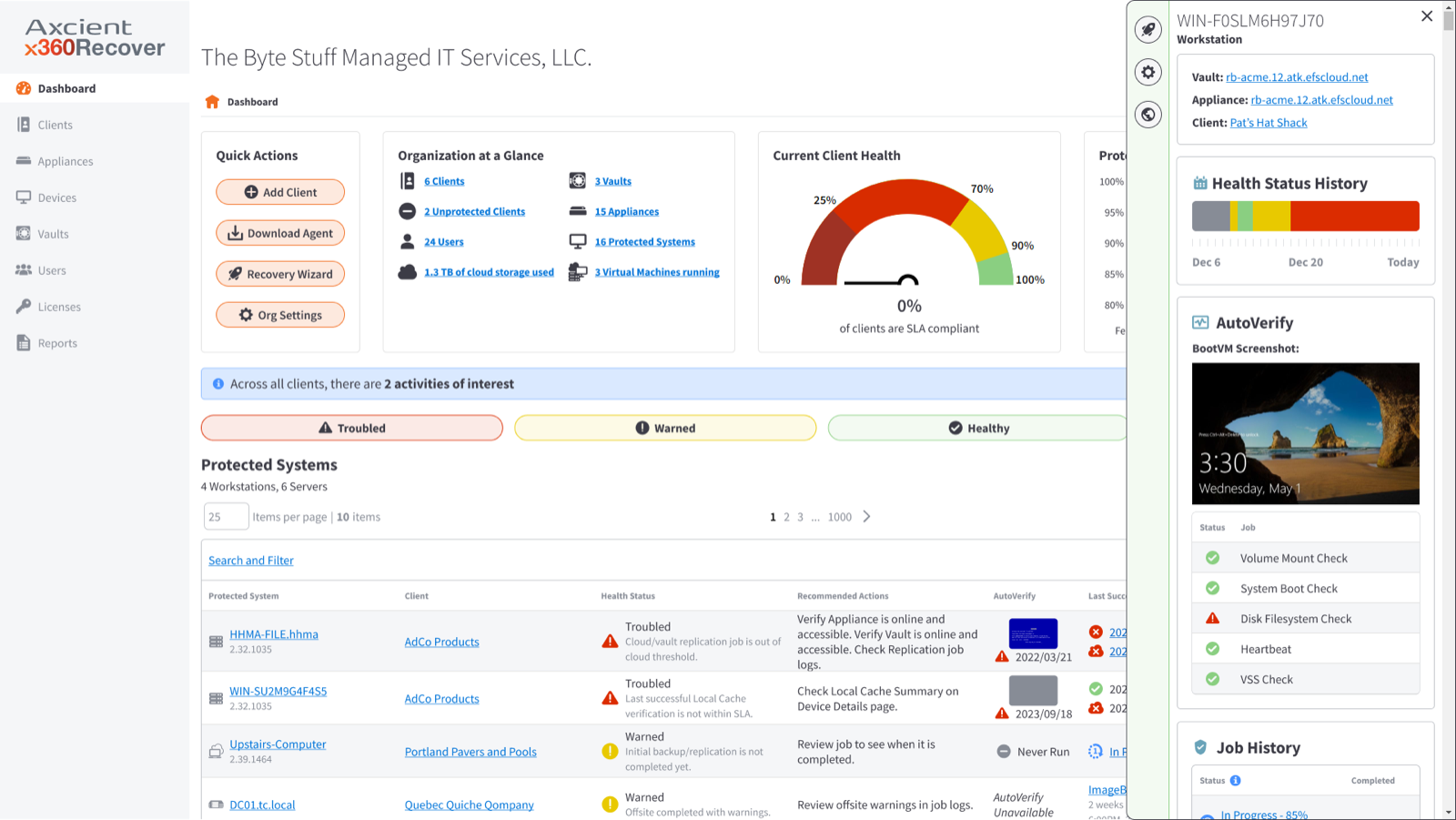
Axcient partners were losing time jumping tabs for alerts, health, and next steps. I designed a contextual sidebar that surfaces just-in-time insights and actions without leaving the dashboard that resulted in boosting engagement 125% and earning a 95% CSAT.
UX Designer · Jul 2023 - Apr 2024
MY ROLE
Design the contextual sidebar pattern.
Synthesized interviews and support data into a flexible in-dashboard panel for alerts, health, AutoVerify, and next actions. Validated with usability testing and engineering.
THE RESULT
Clarity, speed, and confidence in-flow.
125% usage increase, 95% CSAT, and ~27 hours saved per week across partner teams who no longer tab-hop for critical device context.
THE PROBLEM
Partners were losing efficiency to fragmented information.
Without a centralized view, users context-switched across tabs and screens slowing workflows and eroding confidence, especially for power users who needed to act quickly and accurately.
→
Reducing context switching by consolidating key insights into a single, accessible space
→
Surfacing just-in-time information to support faster decision-making
→
Providing shortcuts and next steps to streamline high-frequency workflows
→
Improving clarity and trust by presenting data in a consistent, intuitive format
APPROACH
How do we improve efficiency and surface contextual insights?
We grounded requirements in user interviews, support data, and workflow mapping. Those insights shaped a flexible sidebar pattern that was validated through usability testing and refined with engineering so high-value information surfaces without breaking flow.
Define just-in-time insights
Deliver insights, recent activity, and next-step actions directly in the dashboard — cutting navigation friction and speeding decisions.
Address known context gaps
Synthesize interviews and support data to expose the highest-value information and actions in-line.
Support diverse workflows
Map journeys and prototype multiple layout options to establish a scalable sidebar interaction model.
Ensure clarity & performance
Validate hierarchy in usability tests and partner with engineering on responsive, dynamic content loading.
IN ACTION
Watch the sidebar surface context without leaving the dashboard.
From the main Dashboard, a partner opens a system, checks job status, then reviews another device’s alert — all from the same contextual panel.
DESIGN BREAKDOWN
One view. The modules that matter.
The sidebar consolidates related information and actions without overwhelming the interface, thus reducing context switching for high-stakes MSP workflows.
Alert
A quick, detailed summary of why a device may be experiencing issues.
Device Overview
Maps device to vault, appliance, and client so ownership is obvious.
Health History
30-day performance overview to spot patterns and recurring problems fast.
AutoVerify
Latest validation checks plus BootVM screenshot for visual integrity confirmation.
Job History
Job type, status, and timestamp to catch failed or delayed work without leaving the view.
OUTCOMES
Clarity, speed, and confidence in one panel.
The interactive sidebar transformed how partners engage with the Dashboard by surfacing the right information at the right time.
125%
Usage increase
Partner engagement with key Dashboard workflows rose as the sidebar made features discoverable and actionable.
95%
CSAT
Partners cited improved clarity, less frustration, and better access to information.
27 hrs
Saved / week
Less clicking, tabbing, and searching — hours returned to partner teams every week.
Want to see more?
Next Case Study
Senior UX Designer based in Denver, CO
© 2026 All rights reserved.